Platform / Microsoft Copilot

Give Copilot a workforce brain

Copilot is already where your people work. It summarizes meetings, drafts emails, searches documents. But ask it a workforce question—who's ready for promotion, who's at risk of leaving, what's my best career move—and it draws a blank. Gloat fixes that.
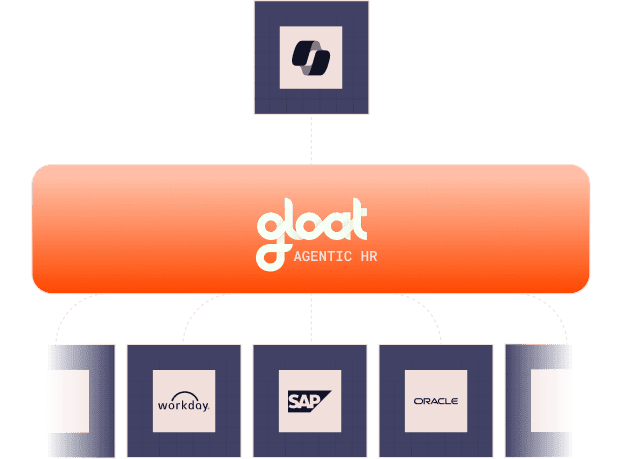
Group 3466759

The gap

Copilot is brilliant at productivity. Blind to talent.

Copilot knows your emails, calendar, documents, and chats. It doesn't know your people—their skills, aspirations, readiness, or risk. That's a different kind of intelligence entirely.

CHALLENGE

Discovery

TODAY

Summarize a meeting

WITH GLOAT

Tell you which attendee is a flight risk

CHALLENGE

Career growth

TODAY

Draft a job description

WITH GLOAT

Find the best internal candidate for the role

CHALLENGE

Manager intelligence

TODAY

Search your emails and docs

WITH GLOAT

Surface an employee's real skills and career aspirations

CHALLENGE

Action

TODAY

Recap a Teams chat

WITH GLOAT

Recommend a development plan for an underperforming team member

Every workforce question hits the same wall: Copilot doesn't have access to talent data, skills intelligence, or career context. Gloat gives it exactly that—as a native Copilot skill.

One skill. Total transformation.

The Gloat skill plugs into Microsoft 365 Copilot natively. No new app. No new interface. No change management. Your people just ask Copilot the questions they've always wanted to ask—and now they get real answers.

01

No new app to learn

Employees already use Copilot. The Gloat skill works behind the scenes. When someone asks a workforce question, Copilot calls Gloat and returns the answer natively. Zero training required.

02

Real intelligence, not search

This isn't keyword search over HR data. It's semantic workforce intelligence—understanding skills, inferring readiness, reasoning about career paths, and weighing multiple factors to give genuinely useful answers.

03

From answers to action

Copilot + Gloat doesn't just answer questions. It proposes next steps: "Want me to draft a development plan?" "Should I flag this to their manager?" "Here are three open roles that match." Intelligence that leads to action.

Same question. Different answers.

See what changes

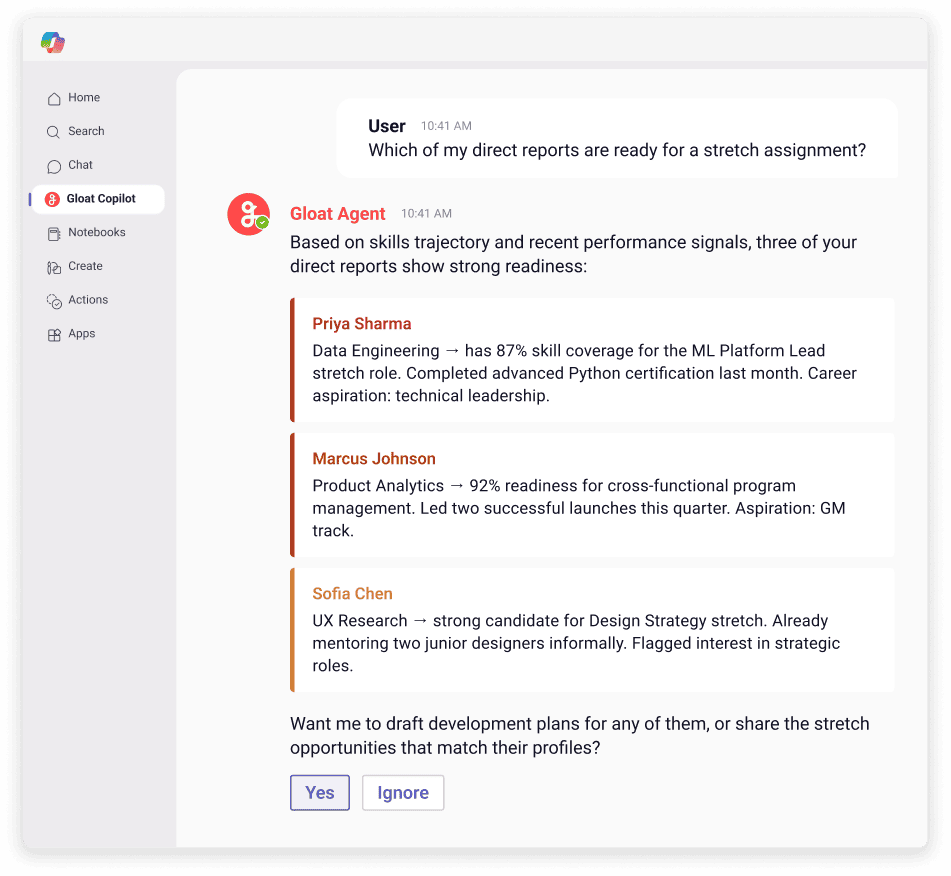
Real questions from managers, employees, and HRBPs. On the left, Copilot alone. On the right, Copilot with the Gloat skill.

People leader

"Which of my direct reports are ready for a stretch assignment?"

COPILOT ALONE

  • I can search your emails and documents for mentions of stretch assignments, but I don't have access to employee skills or readiness data.
copilot 1
Individual contributor

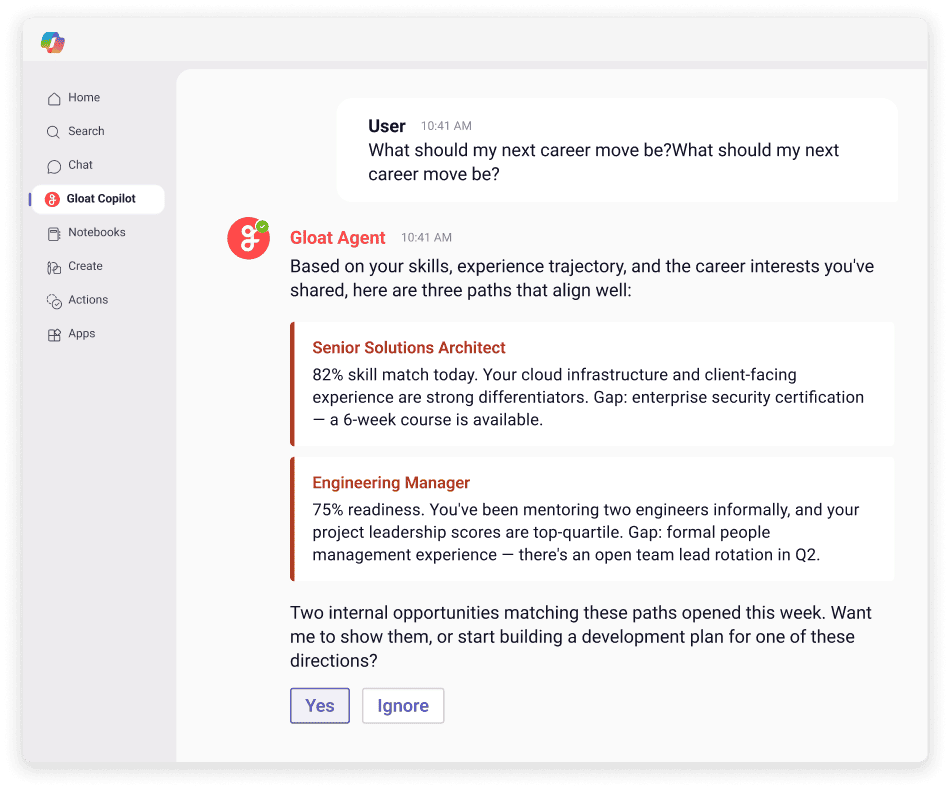
"What should my next career move be?"

COPILOT ALONE

  • I can help you update your resume or search for job postings. Would you like me to look at open positions on your company's career site?
copilot 2
HR Business Partner

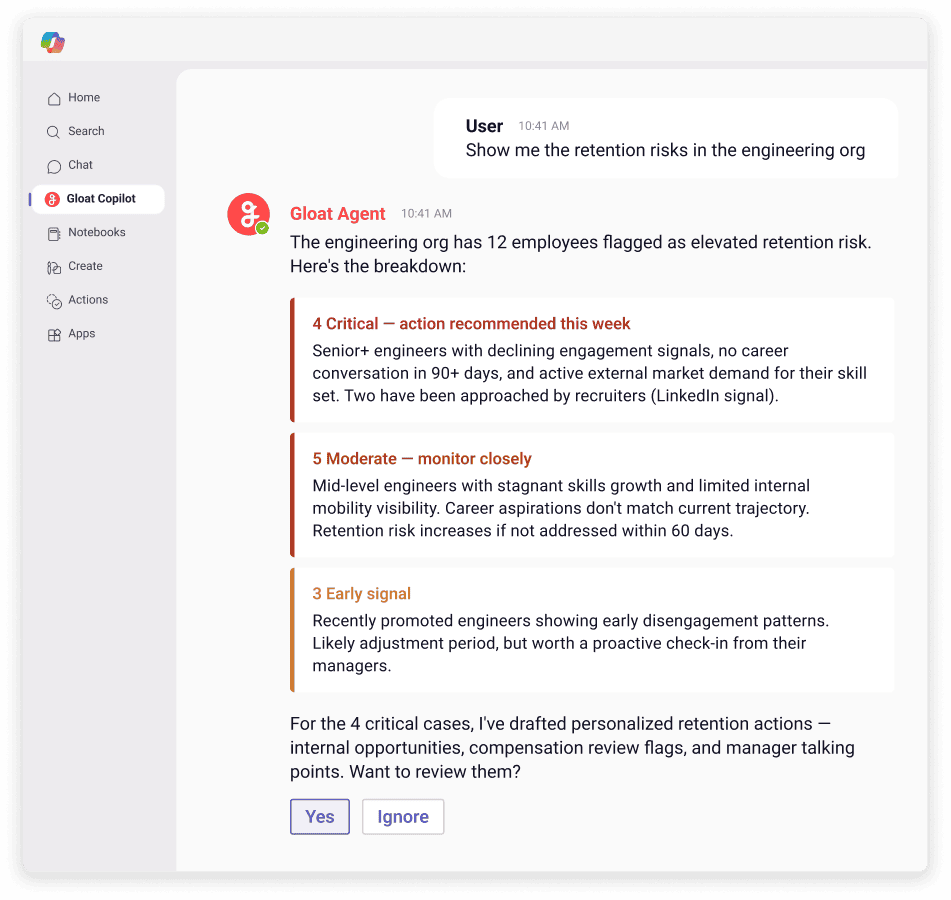
"Show me the retention risks in the engineering org"

COPILOT ALONE

  • I can search for any documents or emails related to engineering retention. Would you like me to look for that?
copilot 3
How it works

A native Copilot skill. Not a bolted-on app.

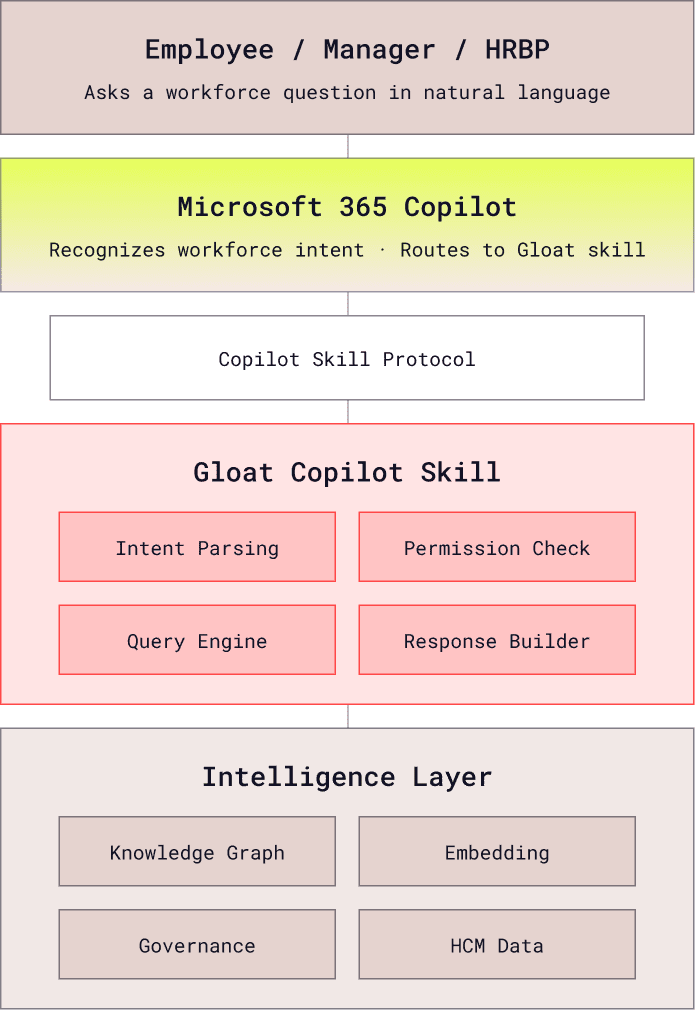
The Gloat skill registers as a native Microsoft 365 Copilot plugin. When a user asks a workforce-related question, Copilot recognizes the intent and routes it to the Gloat skill. The skill queries Gloat's Workforce Context Engine and returns a rich, contextual response—all within the Copilot interface.

1. User asks Copilot Any workforce question in natural language—via Teams, Word, or the Copilot sidebar
2. Copilot routes to Gloat skill Microsoft's skill routing recognizes workforce intent and calls the Gloat plugin
3. Gloat queries intelligence layer The skill calls the Workforce Context Engine—knowledge graph, embeddings, governance rules
4.Contextual response returned Rich, actionable answer appears natively in Copilot—with cards, recommendations, and next steps
table copilot
Deployment

Zero change management.

No training sessions. No change management campaigns. Your people already know how to chat in Teams.rn

Day 1

Admin enables the skill

IT adds the Gloat skill through the Microsoft 365 admin center. Configure which user groups get access. Done.

Day 2

Users ask questions

No announcement needed. Users ask Copilot the same questions they've always asked. When the question is about people, Copilot now has an answer.

Week 2+

Intelligence compounds

Managers discover they can ask about team readiness. Employees start exploring career paths. HRBPs get retention alerts. Word spreads organically.

FAQ

Questions we hear

Is this a chatbot or a Copilot skill?

It's a native Microsoft 365 Copilot skill—not a separate chatbot. Users don't switch apps or learn a new interface. They ask Copilot questions in the same way they already do. When a question involves workforce intelligence, Copilot calls the Gloat skill behind the scenes and returns the answer natively.

What can employees see vs. managers vs. HRBPs?

The skill respects your organization's permission model. Employees see their own skills, career paths, and relevant opportunities. Managers see aggregated team insights—readiness, flight risk signals, development recommendations—for their direct and indirect reports. HRBPs see org-level analytics and can take action across their population. No one sees data they wouldn't have access to in your HCM.

Does this require Copilot for Microsoft 365 licenses?

Yes. The Gloat skill runs inside Microsoft 365 Copilot, so users need active Copilot licenses. Deployment is handled through the Microsoft 365 admin center—your IT team adds the Gloat skill, configures permissions, and it's available to licensed users immediately. No client-side installation.

How is this different from the Gloat Teams integration?

The Teams integration delivers Gloat agents as a standalone app within Teams—a dedicated experience for career exploration, learning recommendations, and opportunity matching. The Copilot skill embeds workforce intelligence directly into Copilot conversations. They're complementary: Teams for the full agentic experience, Copilot for quick workforce answers in the flow of any conversation.

Where does the intelligence come from?

The Gloat skill connects to Gloat's Workforce Context Engine, which ingests data from your HCM (SuccessFactors, Workday, Oracle), LMS, ATS, and collaboration tools. When Copilot calls the skill, it queries this intelligence layer—not raw HCM data. The response is grounded in your organization's actual workforce context, not generic AI.

How fast can we deploy this?

If you already have Gloat connected to your HCM, the Copilot skill can be deployed in days—it's an admin configuration, not a development project. If you're new to Gloat, the full setup (HCM integration + intelligence layer + Copilot skill) takes 8-12 weeks. The Copilot skill itself is the fastest part.


Make Copilot your workforce expert

We'll demo the Gloat Copilot skill live—your data, your questions, real answers.